
Q.I am using the NETC02-CC with the command selection method, but changes to the operation data and parameters are not reflected. What are the possible causes?
The following are possible causes.
D-REQ is not ON
Please confirm the address of the remote I/O.
D-REQ is not turned back to OFF after writing data
Data writing is executed at the ON edge of D-REQ.
After turning D-REQ ON and writing the data, make sure to turn D-REQ OFF once before writing the next set of data.
The ON Time for D-REQ is Short
If the D-REQ is turned OFF before D-END (the command execution request completion signal) is output, writing may fail. After confirming that D-END is ON, please turn off D-REQ.
The remote register address for the data to be set is not correct
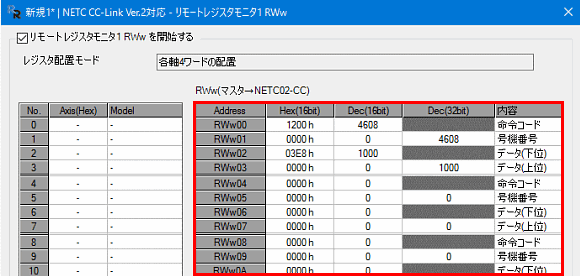
Please verify that the addresses for setting the command code, unit number, data (upper), and data (lower) are correct.
D-ERR is occurring
If the values of the data set for the command code, address number, data (upper), or data (lower) are not appropriate, a D-ERR (command execution error) will occur. Review each setting value.
Investigating Causes and Solution Hints
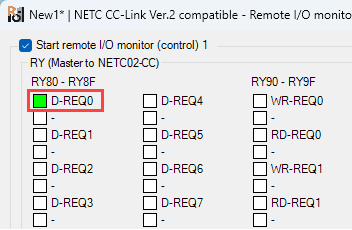
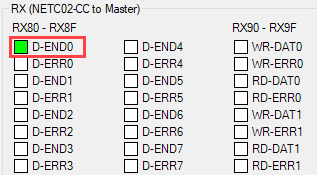
For monitoring Remote I/O, confirming the settings of remote registers, and checking the occurrence of alarms or errors, please make use of various monitoring functions in the support software MEXE02.
[Remote I/O Monitor Screen Example]
[Remote Register Monitor Screen Example]
Product Category: Controller and network compatible products
Model and Series: NETC02-CC
Description: Usage and setting methods, abnormalities and problems
FAQ No.: 459
Related FAQs
Email đến bộ phận Hỗ trợ Kỹ thuật Web
Sau khi mở email, chúng tôi sẽ kiểm tra nội dung và liên hệ với bạn. Xin lưu ý rằng tùy thuộc vào yêu cầu của bạn, chúng tôi có thể gọi lại cho bạn.